
Two ways to make Discord text look small
Quick answer: For chat, type -# then a space, then your words. That line shows smaller than normal. It is not the same as #, ##, or ### headings. Headings look big or bold, not tiny. For nicknames, paste Unicode tiny letters instead.
·
How to make small text in Discord chat with -#
Answer first: Type a hyphen, then #, then a space, then your message. Example: -# hello. Discord shows that line smaller than normal chat text. Official formatting notes live in Discord’s Markdown Text 101. The space after -# matters.
- Click the Discord message box.
- Type
-#and press space once. The space matters. - Type your words and send.
Do not skip the space. -#hello without a space is not the small-chat format.
This is not a heading. A line that starts with #, ##, or ### (and a space) becomes a heading. Headings look big or bold, not tiny. Small chat uses -# with a space.
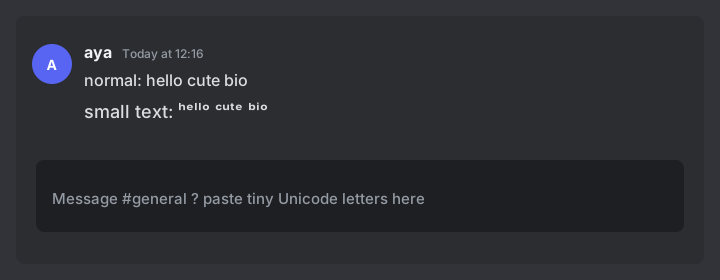
-# shrinks the chat line. Unicode tiny letters are different characters you paste.How to make a small text Discord nickname
-# only works in chat messages. Nicknames need Unicode tiny letters you paste like normal text.
- Open the live bio converter.
- Type the name. Watch the Discord nickname counter (32 characters max).
- Copy a style (Tiny is the usual look).
- In Discord, open Edit Server Profile (or your global display name) and paste.
Each tiny letter still counts as one character. Keep nicks short so you stay under 32.
Discord markdown vs Unicode small text
Use this table to pick the right tool. -# is chat-only. Nicknames need Unicode paste. Headings are not tiny text.
| You type | What Discord does | Use it for |
|---|---|---|
-# hello (hyphen, #, space) | Smaller than normal chat | Quiet chat lines |
# hello / ## / ### | Heading | Titles, not tiny text |
||hello|| | Spoiler | Hide a line |
*hello* / **hello** | Italic / bold | Emphasis |
| ʰᵉˡˡᵒ (paste) | Tiny Unicode letters | Nicknames, aesthetic chat |
Ready sample words live on the tap-to-copy tiny words page.
Small text Discord examples you can paste
| Type this | Result | Where it fits |
|---|---|---|
-# hello | Smaller chat line | Message box |
hello → Tiny style | ʰᵉˡˡᵒ | Chat or nick |
cute → Tiny style | ᶜᵘᵗᵉ | Reply / status |
afk → Tiny style | ᵃᶠᵏ | Nickname tag |
What does not work
- Boxes (□). Some letters have no tiny Unicode form (q is a common gap), or the phone font cannot draw them. Those letters stay normal or show as a box.
- -# in nicknames. The small-chat prefix does not shrink a nickname or role name. Use Unicode there.
- Headings mistaken for tiny text.
#/##/###make headings, not smaller chat. - Mentions and search. People may not @mention a tiny nickname the way they type a normal name.
- Server rules. Some communities ban decorative names. Check before you change a nick.
FAQ: Discord small text
How do you make small text in Discord?
For chat, type -# then a space, then your message. For nicknames, paste Unicode tiny letters. There is no /small command.
Is Discord -# the same as # ## ### headings?
No. -# with a space makes the line smaller than normal. #, ##, and ### make headings. Headings are not tiny text.
Can I use small text in a Discord nickname?
Yes. Paste Unicode tiny letters. Nicknames are limited to 32 characters. -# does not work in nicknames.
Why do I see boxes instead of tiny letters?
Some letters have no tiny form, or the device font cannot draw them. Try a shorter word or a common system font.
Next step
That covers Discord small text for chat and nicks: use -# with a space in messages, and Unicode when you need a tiny nickname.